pcbkit
pcbkit designs, places, routes, checks and exports KiCad boards from Python.
What it does
You describe a board in a few plain Python files and one pcbkit.toml: the circuit
(design.py), where each part sits (layout.py), what the router needs to know
(routing.py), the silkscreen text, and the numbers your checks read (specs.py). pcbkit
turns that into everything else:
- the schematic, with KiCad's ERC run on it, and the netlist;
- the placed board, then the routed copper: your hand-made routes, Freerouting for the rest, ground pours and stitching vias, and KiCad's DRC with schematic parity;
- the fab files: Gerbers and drill files in a zip, a BOM, a pick-and-place file, PDFs and 3D renders;
- design checks that judge the result, and planted mistakes that show the checks work.
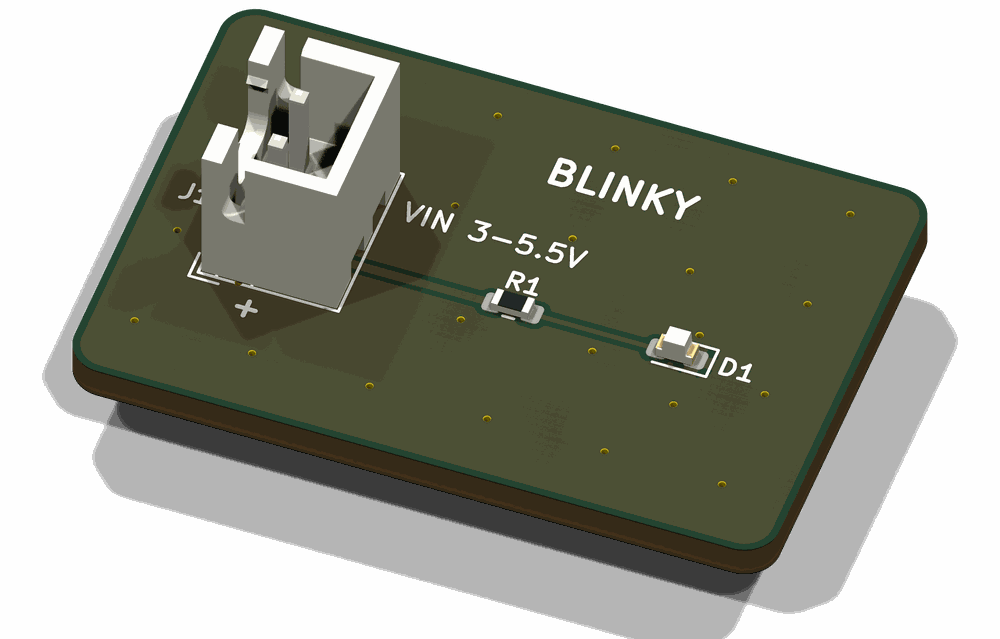
The board in the picture is the blinky example that ships with pcbkit: a connector, a
resistor and an LED, 30 x 20 mm. Getting started builds it.
Why
Because the board is code, it can be reviewed, rebuilt and checked like code.
- Reviewed. A change to a part, a position or a hand-made route is a diff. Nothing lives only in a GUI session, so you can see what changed, and why.
- Rebuilt. The schematic and the board are generated from the same netlist, so they
cannot drift apart. Once you accept a route, it is kept in
golden/, andpcbkit finalizerebuilds the board and the fab files from it without running the router again. - Checked. Every build is judged by checks that read the netlist, the copper and the
fab files, against the limits you keep in
specs.py. A check that has never been seen to fail is not trusted, so pcbkit plants known mistakes and confirms the checks catch them.
Limits
- It makes two-layer boards only.
- It needs KiCad 10 or newer, and is built and tested only on KiCad 10.0.6 on macOS.
pcbkit doctorhas Linux install hints, but Linux has not been tried. - It uses KiCad's SWIG-based
pcbnewPython module, which KiCad has marked as deprecated. You will see KiCad's warning about it at the end of apcbkit checkrun. - The router is Freerouting 1.9.0. It does not promise the same board for the same input, which is why pcbkit keeps the route you accepted.
- The only fab profile is PCBWay's.
- It does not replace KiCad. You can open the generated files in KiCad to look at them, but never to change them: the next build overwrites the file. Change the Python.
Where to go next
- Getting started: install pcbkit and build your first board, then change it.
- Concepts: the project files, the pipeline, golden routes, checks and the two tiers of commands.
- The board project interface: the contract for every file in a board folder.
- Routing recipes: hand pre-routes, keep-outs, pours and stitching.
- Writing checks: project checks, specs, the built-in groups, and proving a check can fail.
- Ordering: the numbers for PCBWay's form.
- The Claude plugin: skills, agents and the guard hooks.
- Troubleshooting and the command reference.